

New telephony services 2026
Lund University is implementing a change of supplier for telephony services. The existing contract ends in March 2026, and the new supplier will be Telia.
The new contract will bring about some changes:
- The landline phones, Avaya, will be phased out.
- When you switch to Telia, you will keep both your existing landline (046-222 xx xx) and mobile numbers.
- New subscription types, where the standard subscription allows for significantly more data than before.
This page will be updated regularly – please check back often for more information and instructions.
Overall timetable
- DONE. November. The new subscription types and service bundles will be published on the Staff Pages, on this page.
- DONE. November 2025 to end of January 2026. Quality assurance of subscriptions.
- DONE. 9 February–10 March 2026. Freeze period in the project. No telephone enquiries will be handled during this period. Urgent cases can be handled; please contact the Service Desk.
- DONE. End of February 2026. Dispatch of SIM cards.
- ONGOING. 10-11 March 2026. Change of supplier and system.
To read/do now
If you have not yet received your SIM card, please contact the administration unit at your faculty, department or equivalent.
Get an overview of your mobile subscription
You can get an overview of your mobile subscription with the Telia at work service.
Log in to Telia at work (only in Swedish)
Here's how: Select Logga in. Enter your mobile number. Click Fortsätt (Continue). You will then receive a code via text message, which you can use to log in.
SIM card, e-SIM, Softphone, watch subscriptions
- SIM cards will be sent out to the businesses from week 9 onwards.
- Everyone will replace their old SIM card with the new one.
- Please wait to replace your SIM card until the actual move takes place; see the Detailed timetable in the tab below. You can replace your card from 4 a.m.
- Please turn off your phone when replacing your SIM card.
If you have an e-SIM, it will be delivered around 5 March, but please wait to install it in your phone. You should install it in your phone either the evening before or the morning after the move (see Detailed timetable below).
Once your new e-SIM from Telia is working, it is important to remove the old Tele2 e-SIM from your phone. Otherwise, it may interfere with Telia's e-SIM.
Activate your e-SIM
Two things to keep in mind when activating:
- If there is already a physical SIM card in your mobile phone and it is linked to the same number that is to be activated, remove it.
- To activate e-SIM as your primary card – i.e. not your secondary SIM in a dual-SIM device – the recipient must be connected to a wireless network and have internet access. If there is no internet access, activation will not be possible.
The guides have been translated from Telia. Some terms may differ; Swedish terms are also provided for clarification.
Activate e-SIM on iPhone
Requirements: An iPhone XS, iPhone XS Max, iPhone XR or later with iOS 12.1 or later.
How to do it:
- Open Settings (Inställningar) and select Mobile Network (mobilnätverk)
- Select Add a mobile subscription (Lägg till ett mobilabonnemang
- The camera app will now open and you will need to scan their QR code (instructions on how to do this will appear on the display)
- When you see the notification ‘Mobile subscription detected’ (Mobilabonnemanget har upptäckts), tap it
- Tap Continue (Fortsätt) at the bottom of the screen
- Tap Add mobile subscription (Lägg till mobilabonnemang)
- eSIM is now activated. You need to enter the PIN code just as if you had inserted a brand new physical SIM card.
Activate eSIM on Android
Requirements: Android model with e-SIM support. NOTE: This guide is based on a Samsung model.
Here's how:
- Open Settings and select Connection
- Select SIM manager
- Select Add eSIM and then Add with QR code
- The camera app will now open and you will need to scan your QR code
- When you see the notification Register new SIM?, select Register
- When the notification Do you want to activate the new agreement appears on the screen, select OK
- You now need to enter your PIN code, and then you're done!
Delete e-SIM
How to erase the eSIM on your iPhone or iPad | support.apple.com
In Softphone for Teams, you can customise your call settings. The guide below describes how to do this – please note, however, that the guide describes some features that are not available at Lund University.
Guide Manage your call settings in Microsoft Teams
The keypad will be visible from week 10
The Softphone keypad will be visible on your computer from week 10, but it will not work until the move on 10–11 March.

Those who have extra e-SIM cards for their main subscription from Tele2 have now received physical SIM cards instead of e-SIMs. However, these can be converted to e-SIMs! After 11 March, you can send a ticket to the Service Desk asking for your extra SIM card to be converted to an e-SIM.
If you already have a watch subscription, it will be activated on 10 March.
If you would like to order a watch subscription, you can do so via the Service Desk. Once your order is complete, activate your subscription as follows.
Please note that this is a translation of Telia's Swedish support instructions, so some expressions may differ from the English interface.
Apple Watch
Ensure that both your mobile phone and watch have the latest software installed, then follow the activation steps below.
- Open the Apple Watch app on your iPhone.
- Tap the My Watch tab, then tap Mobile Network.
- Tap Set Up Mobile Network.
- Done! Connectivity Watch is now activated on your Apple Watch.
NOTE It may take up to five minutes after activation for your mobile network to start working.
Google Pixel Watch
Ensure that both your mobile phone and watch have the latest software installed, then follow the activation steps below.
- Go to Settings on your Google Pixel Watch.
- Tap Connectivity and then Mobile Data.
- Ensure the status is On.
- Open the Google Pixel Watch app on your mobile phone.
- Tap Mobile Network and then Configure a New Profile.
- Select Configure a New Profile via your carrier.
- Done! Connection Watch is now activated on your Google Pixel Watch.
NOTE It may take up to five minutes after activation for your mobile network to start working.
Samsung Galaxy Watch
Make sure that both your mobile phone and watch have the latest software installed, then follow the activation steps below.
- Open the Galaxy Wearable app on your mobile phone.
- Tap Watch settings and then Mobile contract.
- Tap Next.
- You will now be asked if you want to connect your watch to Telia's network. Tap Connect. Done!
- Connection Watch is now activated on your Samsung Galaxy Watch.
NOTE! It may take up to five minutes after activation for your mobile network to start working.
The transfer of subscriptions from Tele2 to Telia will take place in two phases: 10 March and 11 March. The transfer will take place from 4 a.m. each night.
There will be a brief interruption to each subscription when the transfer takes place.
The subscriptions that will be transferred on the night of 10 March are those belonging to the number series
- 046-2220000 - 046-2229999 (Lund)
- 040-391000 - 040-391999 CRC Malmö.
The subscriptions that will be transferred on the night of 11 March are those belonging to the number series
- 040-325400 - 040-325599, 040-325700 - 040-325799 (Malmö Art Academy, Malmö Academy of Music, Malmö Theatre Academy)
- 042-356500 - 042-356799 (Helsingborg Campus)
- 0435-445400 - 0435-445499 TFHS Ljungbyhed (Ljungbyhed School of Aviation).
For those with e-SIM
If you have an e-SIM, it will be delivered around 5 March, but please wait to install it in your phone. You should install it in your phone either the evening before or the morning after the move.
Features that will be changed
Listen to your voice messages at Tele2 or Trio before 10 March. Your old messages will disappear after the move to Telia, and then Telia's voicemail will apply. The old messages will neither be saved nor transferred.
You can manage your voicemail after 10 March using the Telia Touchpoint Plus app.
Guides for Telia Touchpoint Plus can be found at Support Centre.lu.se.
Have you set up call forwarding, call transfers, and schedules? These will not be transferred to Telia.
After the operator change on 10 March, the Telia Touchpoint Plus app will be used for referrals and similar purposes.
Guides for Telia Touchpoint Plus can be found at Support Centre.lu.se.
When we switch to Telia, all restrictions on international calls, premium rate calls and premium rate text messages will be removed. This means that you can make calls and send text messages abroad, but please note that this will incur additional costs and will be billed on top of your basic subscription.
If you want to set up blocking again, please contact Service Desk, supportcenter [at] lu [dot] se (after the operator change on 10 March).
To avoid high costs when you are abroad, it may be a good idea to order an international package for calls and data.
The new agreement does not include the option to block ‘satellite connections for calls, text messages and data’ when you are travelling by boat or plane. Therefore, remember to use your mobile phone's airplane mode to avoid unnecessary costs.
From landline phones, you have been able to call using an extension number (“short number”) within Lund University. With the switch to a new telephone environment, this will no longer be possible; instead, you will have to dial the full number. You can add phone numbers to your mobile phone’s contact list to achieve a similar function.
People who answer calls via group numbers need to use either Ace to Go or Ace Interact.
Ace to Go
The app is downloaded to mobile phones for mobile users.
To log in to the Ace to Go application, enter the identifier ‘lundsuniv’. Please note that this is in lowercase letters.
In the Support Centre, you will find guides for Ace to Go.
Ace Interact
Ace Interact is a web application. You use it through Softphone Teams.
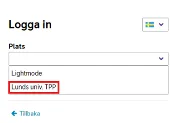
In Ace Interact, there is a drop-down menu where you should select ‘Lunds univ. TPP’.
In the Support Centre, you will find guides for Ace Interact.
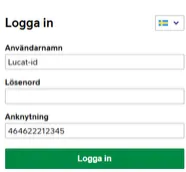
The first time you log in via Ace Interact, you should enter:
- your Lucat ID
- your password
- extension: country code first, then your landline number
More about fixed telephones
The landline will be discontinued and you will therefore no longer be able to use your current landline.
If you do not have a work mobile phone, you will use Softphone via the Teams app instead. It is a web-based telephony interface that allows you to make and receive calls directly from your computer.
Your old Avaya telephone (desk telephone) should be disposed of as electronic waste.
Your landline number (+46 46-222 xx xx) will be transferred to Telia. So even if you have previously only used an Avaya phone and will now have a mobile phone or Softphone, you will still be reachable on and able to use your landline number.
There are certain settings within the University where a landline really is necessary.
- Meeting rooms and similar. Here, a desk phone based on mobile telephony will be provided. This solution is not recommended as an office phone. The business then purchases the hardware (the phone), and the subscription works like a standard subscription.
- Certain types of labs. In a limited number of laboratories, it is not possible to use devices that emit radio waves. Here, there will be the option of phones based on IP telephony. IP telephony includes both hardware and subscriptions.
Today, several people may share the same desk phone (Avaya phone) and have a shared group number. With the change of operator, each individual needs to have a personal subscription in order to log in to the group number.
Subscription types
You get both a landline number and a mobile number. Both numbers are connected to your mobile phone, so you can be reached wherever you are and use switchboard functions directly on your mobile.
Price: SEK 244/month
About the service
This is included:
- 100 GB of data within Sweden
- 50 GB of data within the EU/EEA (i.e. 50 GB of the total data allowance can be used within the EU/EEA)
- 5G on Telia's network
- Free calls, texts and MMS messages within the EU/EEA (to Swedish numbers)
- Speeds of up to 300 Mbit/s
Examples of features:
- Shared phone book and search
- Call forwarding
- Call transfer/forwarding
- Voicemail
- Availability status
- Login/logout response groups
- Outgoing calls from your mobile show your landline number
This is useful for those who are...
… employees with a mobile phone who want to receive all calls on their mobile.
Hardware requirements
Mobile phone (not included in the subscription but purchased separately by the department or equivalent)
Apps/tools
Telia Touchpoint Plus mobile app
This package only includes a mobile subscription. It is not connected to any switchboard and has no switchboard functions.
Price: SEK 150/month
About the service
This includes:
- Mobile subscription
- Mobile voicemail
This is useful for those who are ..
… affiliated with but not employed by the university
Hardware requirements
Mobile phone (not included in the subscription but purchased separately by the department or equivalent)
Apps/tools
None, only a mobile phone.
This package only includes a landline number. You make and receive calls via Microsoft Teams. This means you don't need a regular phone, just your computer and a headset.
Price: SEK 145/month
About the service
Examples of features:
- Shared phone book and search
- Call forwarding
- Transfer/move calls
- Voicemail
- Availability status
- Logging in/out of response groups
This is useful for those who are....
employees who do not need a mobile phone but make calls via the Teams application installed on their computer
Hardware requirements
Computer (not included in the subscription but purchased separately by the department or equivalent)
Apps/tools
The Teams app
This service provides you with a landline number with switchboard functionality. To use the service, you need a special IP telephone (Snom model) that is connected to Lund University's network via a network cable.
Price: SEK 350/month
About the service
- Display on the telephone
- Call forwarding
- Referral via button selection on the display
- Option to move or transfer calls
- Voicemail
It is not possible to log in to group numbers with an IP telephone.
Suitable
IP telephones may only be used in specific cases; see the description of the service below.
Hardware requirements
The hardware is included in the IP telephony package.
When is an IP telephone suitable?
IP telephones should only be used in special cases, for example in environments where wireless communication is not permitted, such as laboratories where it is important for security reasons to be able to make external calls.
The number of IP telephones is limited and must be approved in each individual case to avoid procurement due to high order value.
Please note: It is not possible to log in to group numbers with an IP telephone.
There are four levels of mobile broadband subscriptions:
- Mobile broadband 10 GB
- Mobile broadband 50 GB
- Mobile broadband 100 GB
- Mobile broadband unlimited
The Telematics/M2M service enables mobile communication for equipment that only uses text messages and data. Examples:
- Alarms
- Equipment monitoring
- Parking meters
We have had to make some choices in order to successfully complete the switch to Telia. That is why we are currently offering a smaller number of service packages. Once the switch is complete, there will be more options available.
The package we have removed for the time being are:
- Standard Plus. A package where you have a landline number linked to Teams, as well as a separate mobile number for your work phone.
The Fixed mobile phone (Fast mobiltelefon) option is a standard subscription used in a desk phone. The fixed desk phone is not included in the subscription but is purchased separately by the business.
A few people currently use Teams to make calls. They will receive similar solutions via Telia.
Additional services
Below is a brief description of the additional services that will be available after the operator change.
All subscriptions include one main SIM card and two extra SIM cards. If you would like more, each additional card costs SEK 99.
You can only have one watch subscription via Telia. A watch subscription is a mobile subscription for smartwatches. This allows the watch to make calls, receive messages and use apps directly via the mobile network even when the phone is not nearby.
Costs SEK 49/month.
Call barring services will be available to prevent international calls, for example. Call barring is included, even if you travel abroad.
For those who only call abroad occasionally
If you rarely call abroad (and do not have a call barring service), you can call abroad using your subscription. The call cost depends on the length of the call and where you are calling.
You can see the cost on Telia's website | Telia.se. (Web site in Swedish)
The call charge will appear as an invoice in Lupin.
For those who often travel abroad or make regular international calls
For calls/surfing with or in countries within the EU/EEA
- You can use your mobile subscription as you would at home in Sweden when travelling in the EU/EEA without any extra costs for calling or surfing. Surfing costs nothing extra within the EU/EEA but is limited to 50 GB for all our subscriptions.
- For those who frequently call from Sweden to other countries within the EU/EEA, as well as Switzerland and the UK, there is the option to purchase an add-on package, Ringa från Sverige till EU/EES (inkl Schweiz och UK) [Call from Sweden to the EU/EEA (including Switzerland and the UK)]. It costs SEK 19/month and includes free calls to the EU/EEA, including Switzerland and the UK.
The fee for the add-on package is charged as a monthly fee on your subscription (not via Lupin).
For voice calls/data usage with or in countries outside the EU/EEA
These are additional services that offer discounted prices for voice calls and data usage. They are ordered via the Service Desk and are charged as a monthly fee on your subscription (not via Lupin).
- Samtal i utlandet [Voice calls abroad]. Information about this service is available at Telia.se. 199 SEK /month
- Surf i utlandet [Data usage abroad]. Information about this service is available at Telia.se. 199 SEK/month
- Ringa från Sverige till USA [Call from Sweden to the USA]. This includes free calls to the USA from Sweden. 149 SEK/month
Please note that the prices you see on Telia.se may differ from the price agreed by Lund University.
The new agreement does not include the option to block ‘satellite connections for calls, text messages and data’ when you are travelling by boat or plane. Therefore, remember to use your mobile phone's airplane mode to avoid unnecessary costs.
Guidance for managers
| Subscription type | Price SEK/month |
|---|---|
| Standard incl 100 GB data | 244 |
| Standard unlimited data | 294 |
| Standard Plus incl 100 GB data | 244 |
| Standard Plus unlimited data | 294 |
| Softphone (Teams) | 145 |
| IP telephony | 350 |
| Landline mobile phone | not defined |
| Unlocked mobile with 100 GB data | 150 |
| IoT telematics incl. 5 GB | 55 |
| Extra SIM card * | 99 |
| Watch subscription | 49 |
| Calls from Sweden to the EU/EEA | 19 |
| Calls from Sweden to the US | 149 |
| Calls abroad | 199 |
| Surfing abroad | 199 |
*) All subscriptions include one main SIM card and two extra SIM cards. Each additional SIM card costs 99 SEK/month.
| Broadband | Price SEK/month |
|---|---|
| Mobile broadband 10 GB | 79 |
| Mobile broadband 50 GB | 139 |
| Mobile broadband 100 GB | 199 |
| Mobile broadband unlimited | 299 |
From November until 23 January 2026, work was carried out to ensure the quality of subscriptions at Lund University. Do employees have the right subscriptions? An email with instructions was sent out to heads of faculty offices, heads of divisions, and equivalent positions at the beginning of November.
Luted will be closed for a period due to the transition to Telia. Luted will reopen after the move once the data has been secured.
Background
During autumn 2024, the University worked to improve the accuracy of the data it held about telephony. The work focused on answering the following questions:
- Was the right person listed on the subscription?
- Were there subscriptions that were not being used and could be cancelled?
- Were there people who had left but whose subscriptions were still active?
- Were costs charged to the right cost centres or should they be adjusted?
As a result of this work, around 800 subscriptions were cancelled, which meant a saving for Lund University and laid important groundwork for the procurement.
A procurement for a new telephony solution for Lund University was finalised in June 2025. The existing contract expires on 31 March 2026. The new supplier is Telia.
Currently, the University owns servers, systems and licences for telephony. In the new contract, these will be purchased as a service. This means that the operator (Tele2), the switchboard system (Avaya) and the referral system (Trio) will be replaced by a single supplier, Telia. This will see the University's telephony upgraded to modern technology, whilst also lowering costs.
Contact
The Support Centre
Resolve your issues in the Support Centre.
supportcenter.lu.se
The Service Desk
+46 46 222 90 00
servicedesk [at] lu [dot] se
Opening hours Weekdays 08:00–17:00
Lund University Switchboard
+46 46 222 00 00
Opening hours Weekdays 08:00–16:30